How to Be Successful on Upwork in 2026: Do’s and Don’ts for New Freelancers

Rukshanda Mahmood
3 October 2026
Starting on Upwork in 2026 can feel a little overwhelming. You create a profile, upload a few samples, write what you think is a decent proposal, and wait. Nothing happens. You try again. Still nothing.
Honestly, this is where many beginners start doubting themselves. They assume the platform is too competitive, experienced freelancers have taken all the good clients, or perhaps they need to lower their rates to get noticed.
But here's the thing: getting your first Upwork client isn't just about having a skill. It's about how you position that skill, identify the right opportunities, and communicate your value.
Think of Upwork as a crowded marketplace. If you open a stall selling everything to everyone, customers may walk straight past you. But if you solve a specific problem for a particular group of people, they have a clearer reason to stop and listen.
Whether you're a web developer, designer, writer, virtual assistant, or aspiring AI specialist, the same principle applies. You need a focused profile, a convincing portfolio, carefully selected jobs, and proposals that make clients feel understood.
In this guide, I'll explore the practical do's and don'ts of succeeding on Upwork in 2026, including profile optimization, proposal writing, pricing, reputation management, and web development opportunities worth exploring.
1. Do Choose a Narrow Freelancing Niche Instead of Offering Everything
One of the biggest mistakes new freelancers make is trying to appeal to everyone.
Their profile says they are a web developer, graphic designer, WordPress expert, Shopify specialist, SEO consultant, and sometimes even a content writer. It sounds impressive at first, but from a client's perspective, it can be difficult to understand what they actually do well.
Specific positioning makes it easier for clients to understand why they should hire you.
For example, compare these headlines:
- Generic: Web Developer | WordPress | Shopify | React | Node.js
- Specific: Shopify Developer for Mobile Checkout and Store Performance
- Specific: React Developer for SaaS Dashboards and Landing Pages
Which one tells a potential client more clearly what problem you solve?
Think of your profile as a shop window. If you display everything imaginable, people might walk by without understanding what you're selling. But when you display one clear specialty, the right customers are more likely to stop.
How to Choose Your Upwork Niche in 2026
Start by combining three things:
- A skill you can genuinely deliver.
- A problem businesses are willing to pay to solve.
- A particular type of client you understand.
For instance, instead of offering general web development, you could specialize in Shopify speed optimization for small e-commerce businesses. If you're a React developer, you might focus on SaaS dashboards, frontend performance, or converting Figma designs into responsive websites.
You don't need to become an expert in every technology. You need to become useful enough in one area that clients can recognize your value.
And remember, your niche can evolve as you gain experience. There's no need to lock yourself into one service forever.
2. Do Build a Portfolio Even If You Have Zero Clients
Here's a frustrating part of freelancing: clients want experience before hiring you, but you need someone to hire you before you can gain experience.
So, what do you do?
You create your own proof of ability.
Upwork allows new freelancers to showcase relevant portfolio work, including personal and sample projects. You don't necessarily need a history of paid contracts to demonstrate your skills.
What Should Your First Portfolio Include?
If you're a web developer, create two or three realistic projects that demonstrate the work you want to sell.
Project 1: An e-commerce store redesign
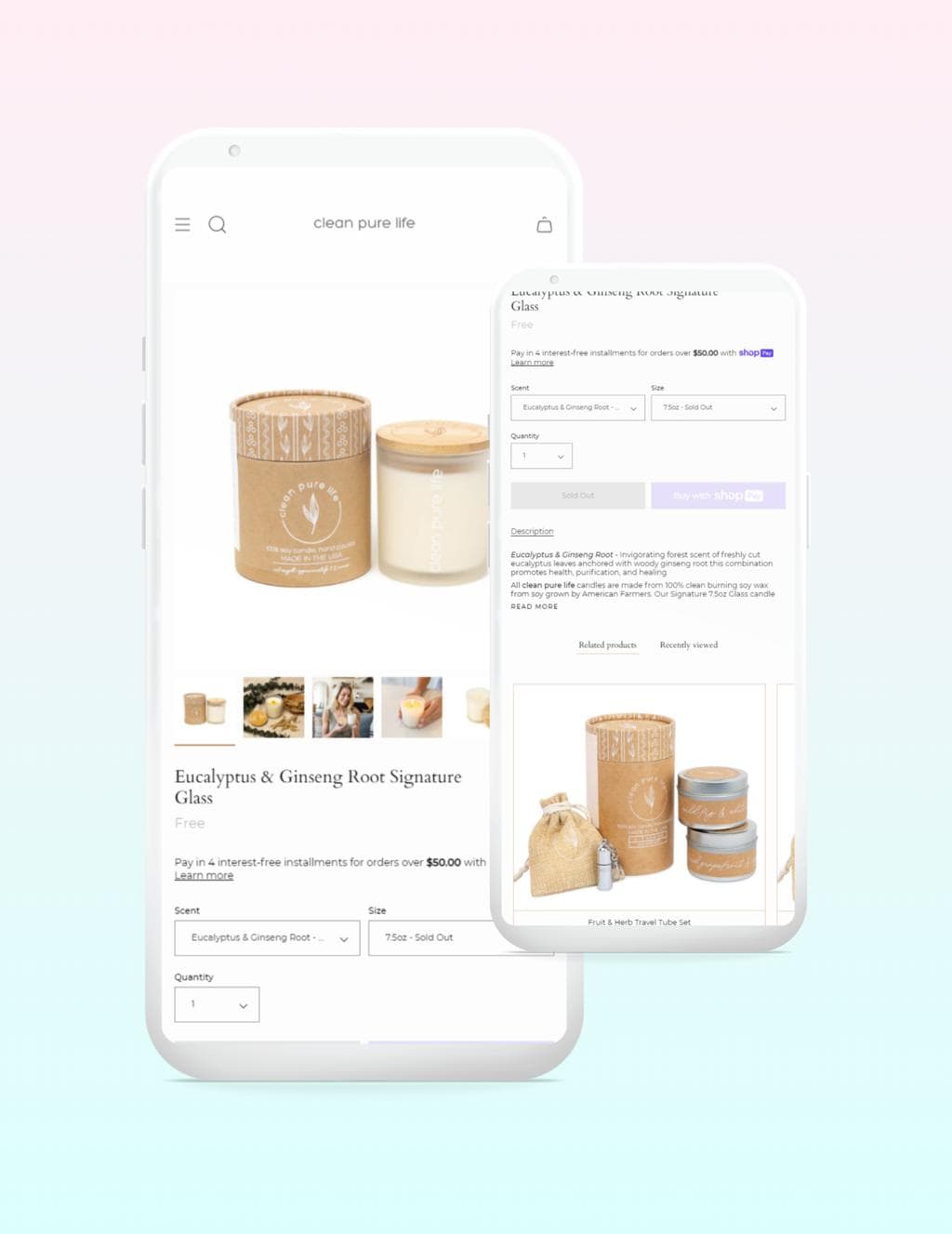
Create a sample Shopify or WooCommerce storefront. Focus on mobile responsiveness, product presentation, navigation, and checkout usability.
Project 2: A SaaS dashboard
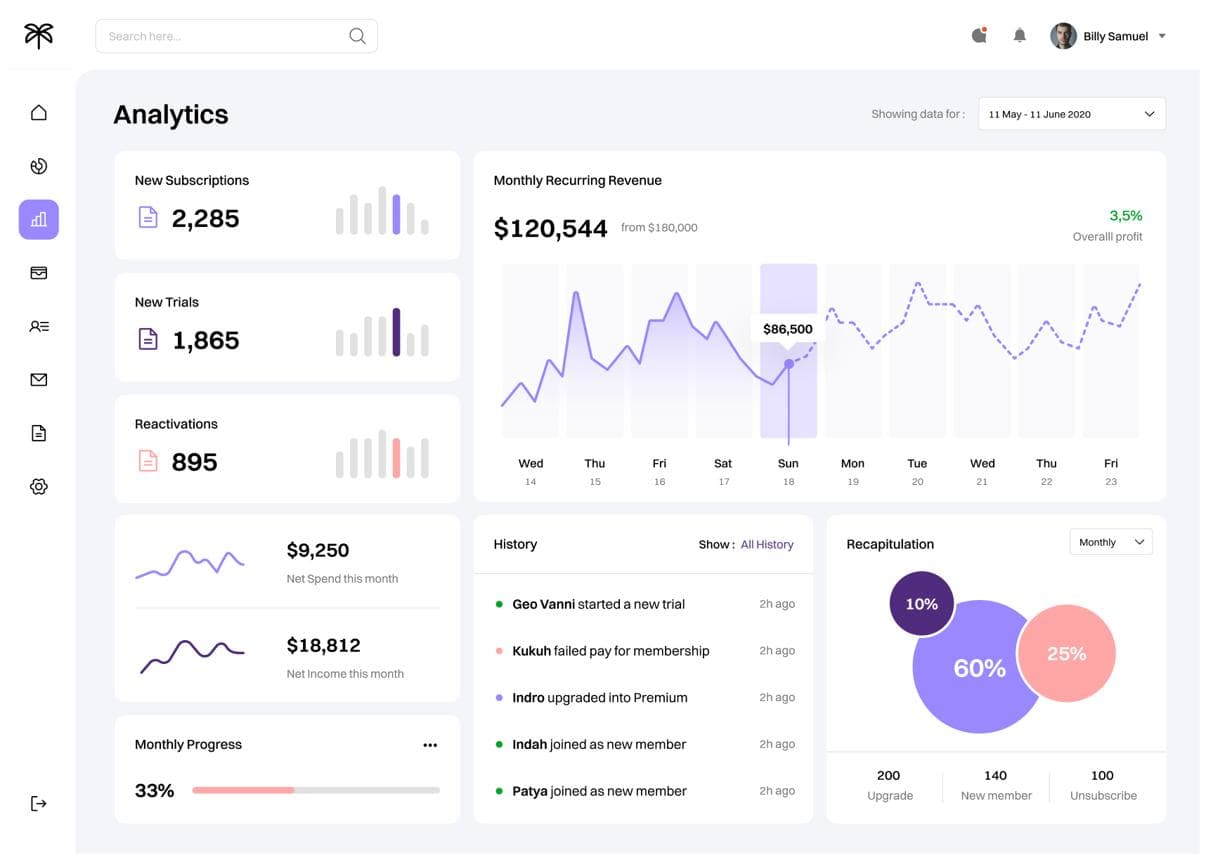
Build a React dashboard featuring charts, filters, reusable components, and realistic sample data.
Project 3: A website performance case study
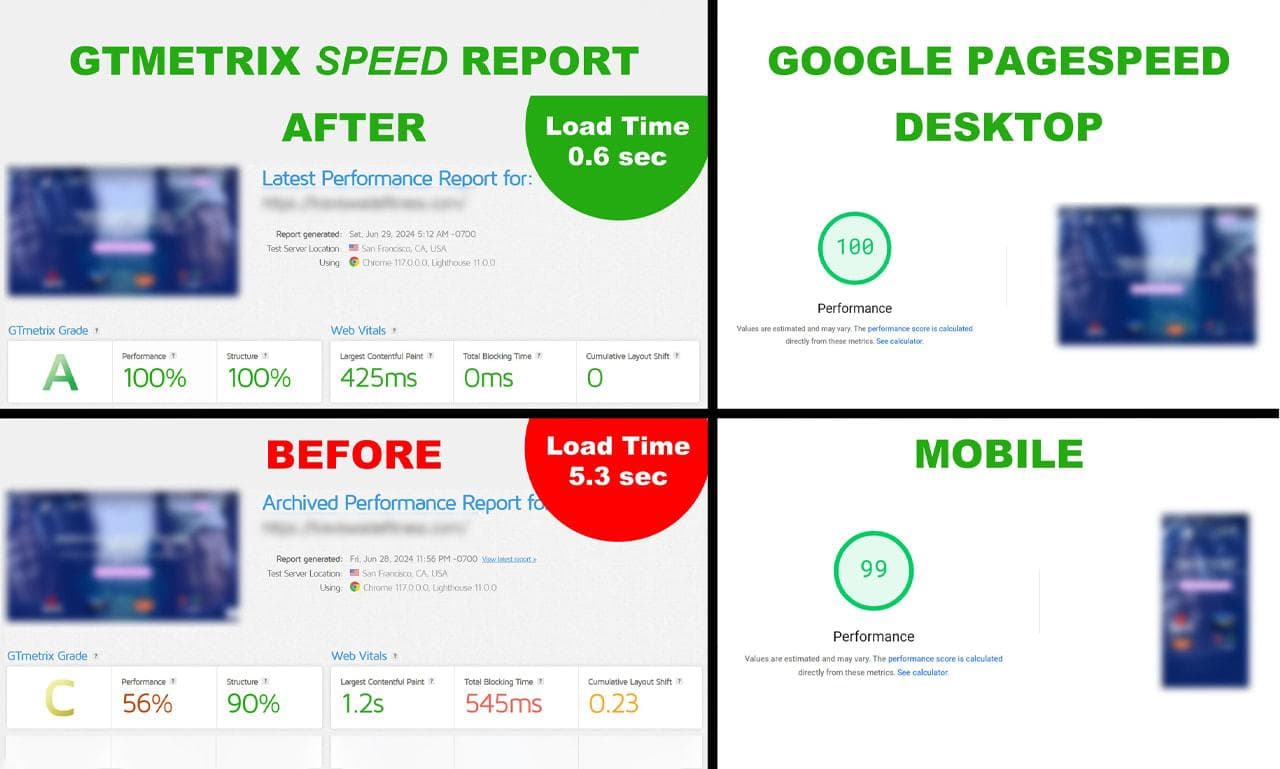
Demonstrate how you measured performance, identified bottlenecks, and improved the site. Use genuine measurements rather than invented results.
For every project, explain the client's hypothetical problem, your approach, the technologies you used, and the final outcome. Clearly label personal projects as demonstrations rather than paid client work.
Honestly, a small project with a clear explanation can communicate more than a portfolio containing ten unfinished experiments.
Your portfolio is like a restaurant tasting menu. Clients don't need to sample every dish you've ever prepared. They need enough evidence to trust that you can deliver the meal they're looking for.
3. Do Write Proposals That Focus on the Client's Problem
Your proposal is not your autobiography.
Clients already have your profile available. When they open a proposal, they want to know whether you've understood their requirements and can help them achieve the desired result.
A weak proposal might say:
Hello, I am a professional web developer with five years of experience. I have expertise in HTML, CSS, JavaScript, React, WordPress, Shopify, and many other technologies. I am hardworking and dedicated. Please give me a chance.
The problem? Almost every sentence could be copied into another application.
A stronger proposal refers to something specific in the job description.
A Practical Upwork Proposal Template for Beginners
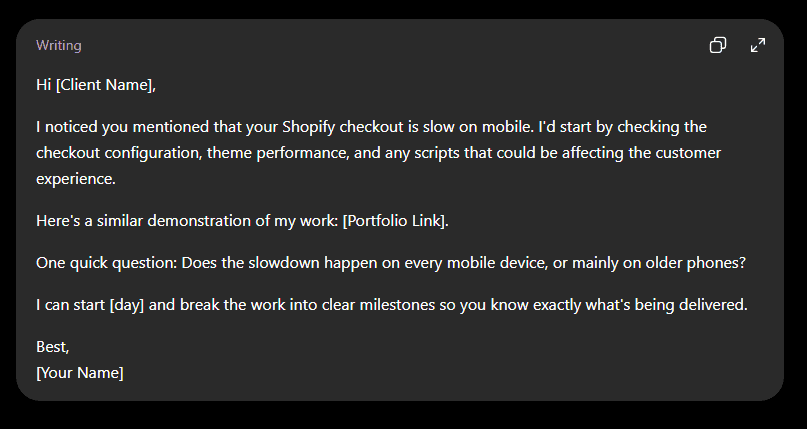
Adapt this template to the actual job. Don't pretend you've solved a problem you haven't worked on, and don't claim results you can't demonstrate.
Do's for Writing Proposals on Upwork
- Mention one specific requirement from the job description.
- Explain your approach in plain English.
- Include one relevant portfolio sample.
- Ask a useful question when clarification is needed.
- Keep the proposal concise and easy to scan.
- Answer any additional application questions carefully.
Upwork's own guidance and interface can change, so check the current proposal form and instructions when applying: Upwork's freelancer guide .
Think of a proposal as a first conversation, not a formal job application. You wouldn't walk into a meeting and spend ten minutes talking about yourself before asking what the business needs, would you?
And don't copy and paste the same generic proposal into 30 different jobs. A reusable framework is fine. A proposal that ignores the actual job is not.
4. Do Apply Selectively Instead of Wasting Connects
Every proposal has a cost, even when it doesn't win you a contract.
Upwork uses Connects as its proposal-submission currency, and additional Connects can cost money. Boosting a proposal may also consume extra Connects. The precise amount required varies by job and the platform's current rules.
This means applying to every remotely relevant job can drain your budget before you've learned what works.
How to Find Better Upwork Jobs in 2026
Before submitting a proposal, consider the following:
- Does the job match your actual skills?
- Is the client's budget realistic for the requested work?
- Is the scope clearly explained?
- Does the client have a credible hiring history or other useful trust signals?
- Can you provide a relevant example of your work?
- Are the requirements achievable within the proposed deadline?
Look for recently posted jobs and review the proposal count, but don't treat a low proposal count as a guarantee of success. A job with three proposals can still attract strong candidates, while a job with more applications may still be suitable for you.
Similarly, clients with no previous hires can be worth considering, but check the payment method, project details, and communication style rather than assuming every new client is trustworthy.
Should You Boost Your Upwork Proposal?
Sometimes boosting may make sense, but it isn't a shortcut to winning work.
First, ask yourself whether your proposal is already relevant and convincing. Paying extra to promote a weak application is like putting a billboard in front of a shop that sells something nobody understands.
Test your approach with carefully selected jobs before spending more on visibility. Track how many proposals lead to interviews and how many interviews become contracts.
The goal isn't to send the most proposals. It's to make your proposal budget work harder.
5. Do Explore the Most Promising Freelancing Skills in 2026
If you're starting on Upwork, it's worth paying attention to where clients are spending money. You don't need to chase every trend, of course, but understanding demand can help you choose a specialty.
Upwork's official 2026 In-Demand Skills report , published on February 4, 2026, reported the following year-over-year growth in selected AI-related skills on its marketplace:
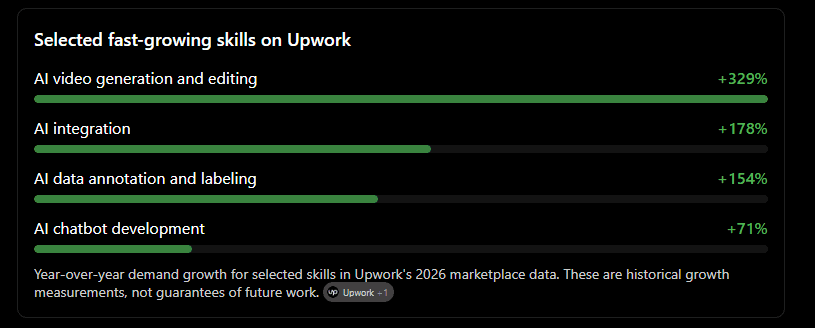
Year-over-year demand growth for selected skills in Upwork's 2026 marketplace data. These are historical growth measurements, not guarantees of future work.
The report also identifies full-stack development, web design, and front-end development among the most in-demand coding and web development skills. So, established technical skills haven't suddenly become irrelevant just because AI tools are improving.
Which Web Development Niches Should Beginners Consider?
Shopify and WooCommerce development
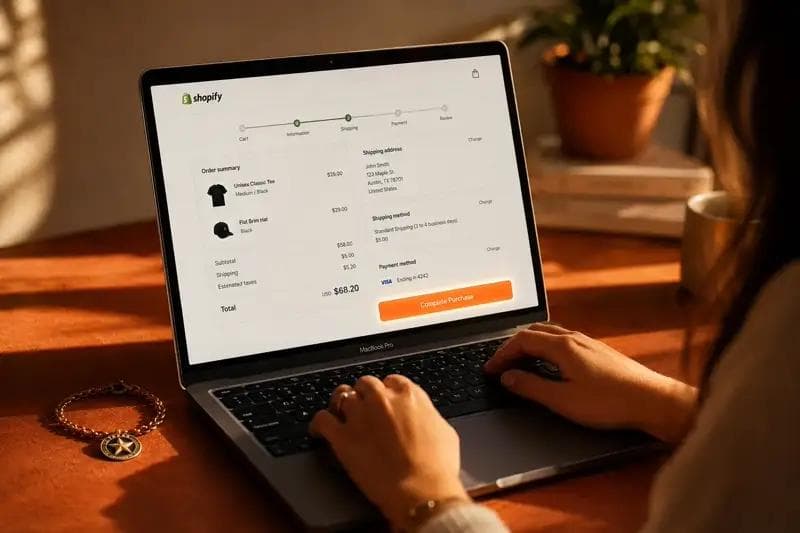
Focus on theme customization, product pages, store migrations, mobile usability, performance, and checkout-related improvements. Learn the relevant platform's current architecture rather than relying on outdated tutorials.
Figma-to-React development
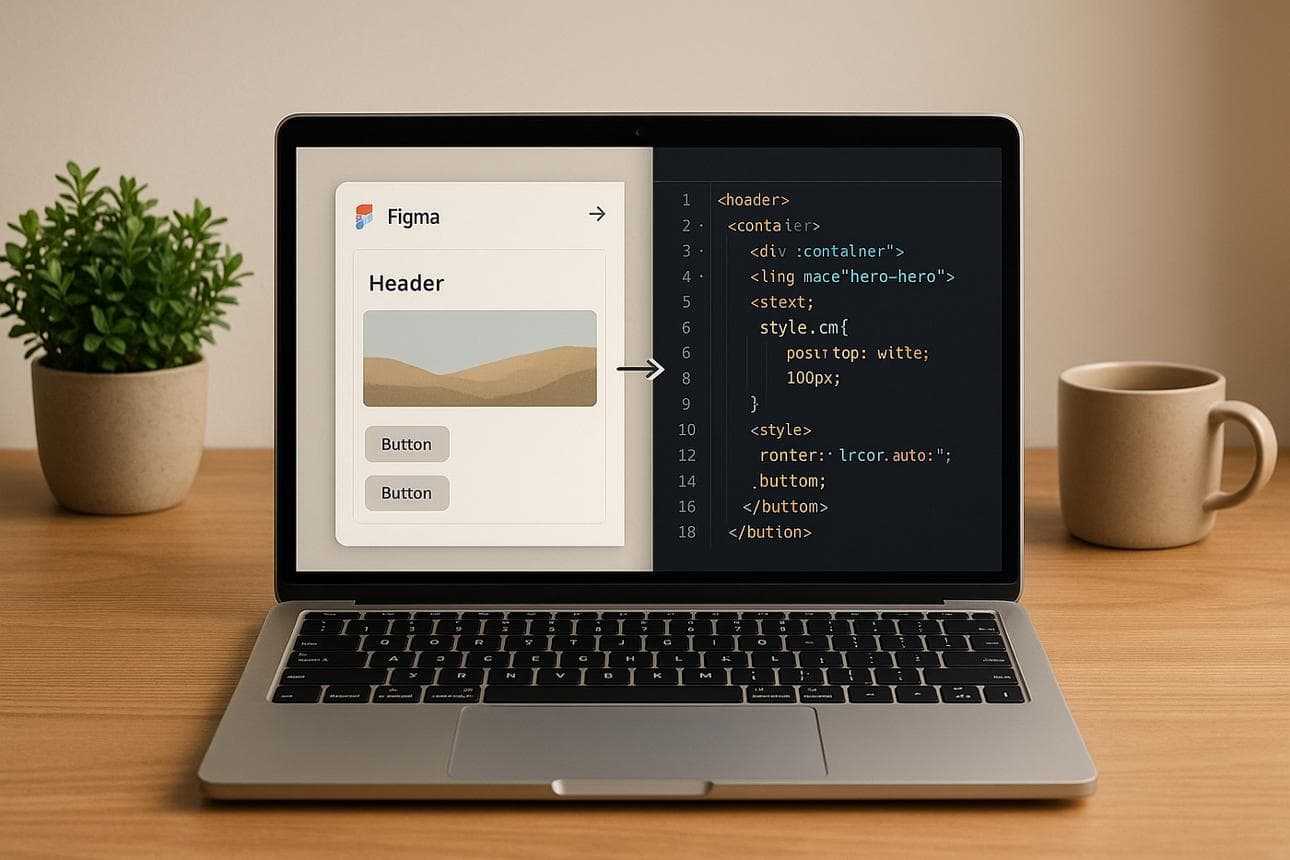
Convert approved designs into responsive websites and reusable components. Accessibility, responsive layouts, and reliable implementation can help you stand out.
AI integration for existing websites
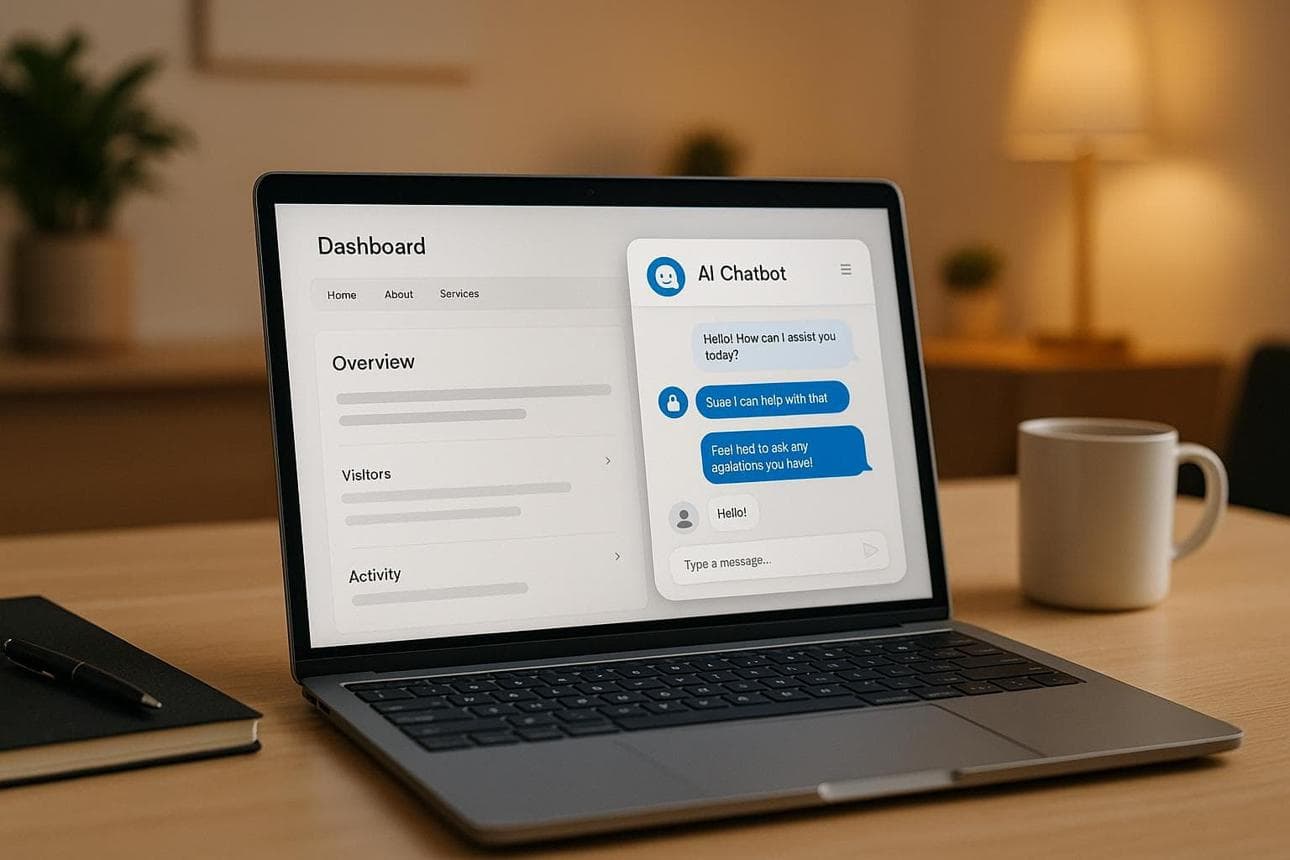
Help businesses add customer support assistants, document search, lead qualification, or other AI features. Learn about data privacy, API costs, reliability, and human handoff before offering these services.
Website speed and performance optimization
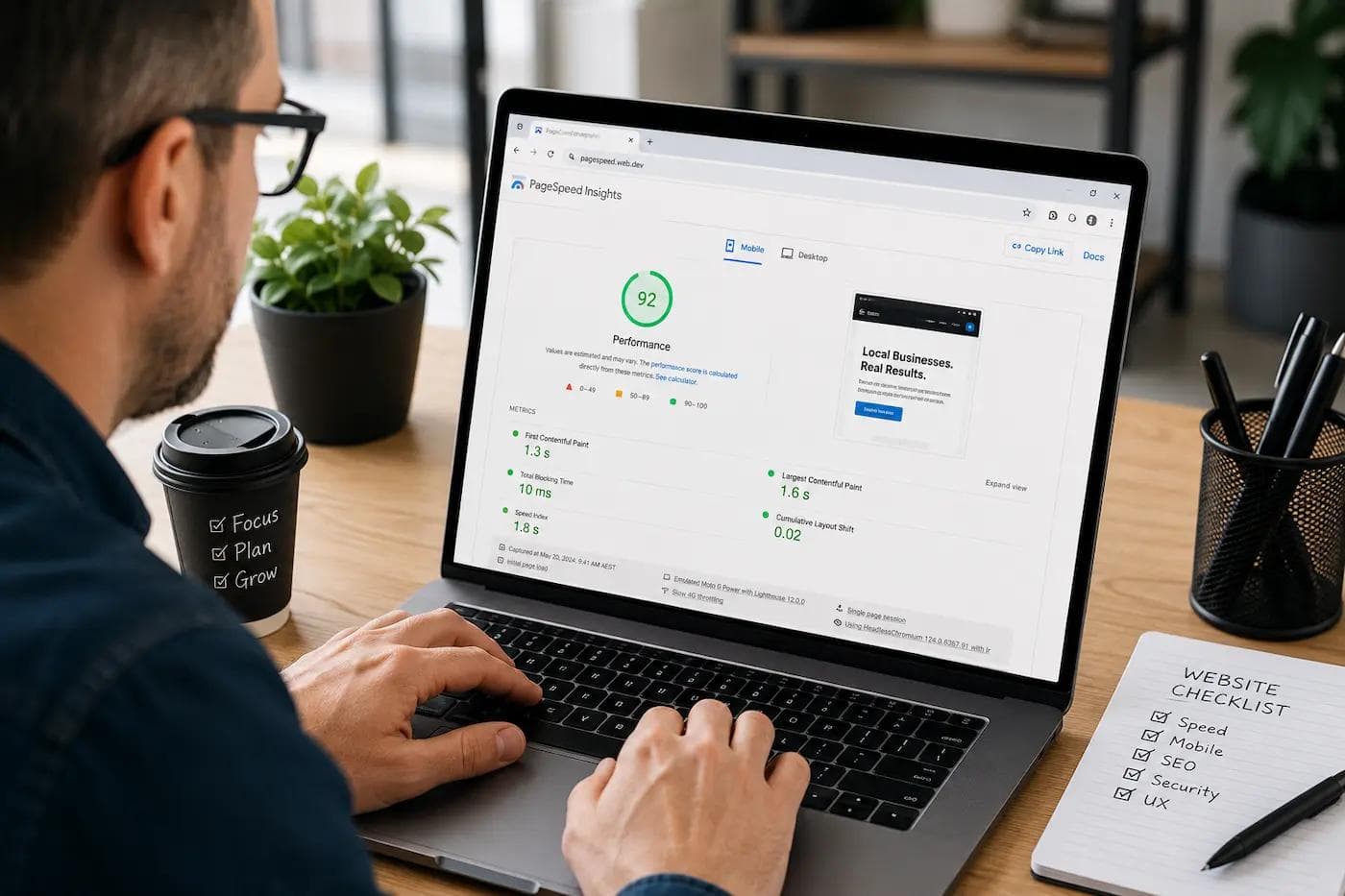
Help clients identify slow pages, oversized images, inefficient scripts, and rendering problems. Measure the starting performance and document the actual improvements.
One important point: don't choose AI integration simply because its demand is growing. You still need the skills to build, test, and maintain what you're selling.
And if you already know React, for example, you may be better off specializing in SaaS frontend development first and adding AI integration later.
6. Do Price Your Services Realistically
Let's talk about pricing, because this is where many beginners get stuck.
Some freelancers believe they should charge almost nothing until they have several reviews. Others copy the rates of experienced freelancers and wonder why clients don't respond.
Neither approach guarantees results.
Your rate should reflect your current ability, the project's complexity, the client's requirements, and the value you can reasonably deliver.
Should You Charge Less to Get Your First Upwork Client?
You can offer a smaller, clearly defined project at an accessible price without positioning yourself as the cheapest freelancer on the platform.
For example, a beginner web developer could offer a fixed-price landing page, a limited bug-fixing task, or a specific responsive-layout improvement rather than agreeing to rebuild an entire website for a very low fee.
Think of your rate as a foundation. If you build it too low, you may find yourself working twice as hard just to reach a sustainable income.
Understand Upwork's Freelancer Service Fee
Upwork's current published freelancer service fee ranges from 0% to 15% per contract, and the applicable percentage is shown before you submit a proposal or accept an offer. Don't automatically assume that every contract carries a flat 10% fee.
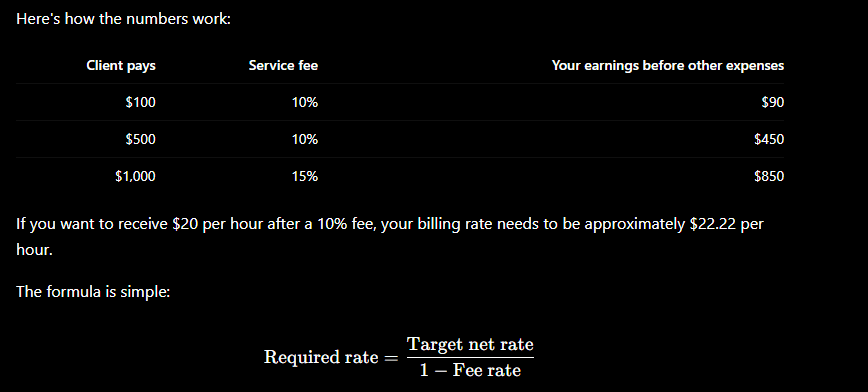
Remember to account for taxes, currency conversion, software subscriptions, unpaid administrative time, and other business expenses separately.
7. Do Protect Your Job Success Score and Client Relationships
Getting hired is only the first part of the process. Once a client trusts you with a project, your next responsibility is to deliver what you promised.
Your reputation is an asset, and it takes time to build.
Upwork's Job Success Score (JSS) reflects client satisfaction, contract outcomes, and longer-term working relationships. Upwork says it considers contract history across six-month, 12-month, and 24-month timeframes, and updates the score daily.
How to Build a Strong Reputation on Upwork
Start with the basics:
- Agree on the deliverables before starting.
- Break complex projects into manageable milestones.
- Communicate delays early instead of disappearing.
- Ask questions when requirements are unclear.
- Test your work before submitting it.
- Keep the client informed about progress.
- Document important decisions and approvals.
Don't promise a two-day delivery if you realistically need five days. It is much better to set a reasonable deadline and meet it than to make an impressive promise and disappoint the client.
And don't assume a public five-star review tells the whole story. Upwork's JSS uses broader client feedback and contract-related signals, so public ratings alone do not guarantee a particular score.
What Are Rising Talent and Top Rated Badges?
These badges can help communicate your standing on the platform, but they should be treated as milestones rather than your entire business strategy.
According to Upwork's published eligibility guidance:
- Rising Talent: Eligibility can involve an invitation or, among other requirements, an average rating of at least 4.8 and $250 in earnings during the previous 12 months. Profile completeness, identity verification, account standing, and other conditions also apply.
- Top Rated: Generally requires a JSS of at least 90%, at least $1,000 in 12-month earnings, a complete profile, sufficient time on the platform, sustained performance, and other eligibility conditions.
Review the current official requirements because eligibility rules may change.
Don't chase badges at the expense of good work. Consistent delivery and professional communication are the habits that help build the underlying reputation.
8. Don't Make These Common Upwork Mistakes
You can have the right skills and still struggle if you make poor decisions about which clients to work with or how you manage your account.
Here are the mistakes worth avoiding from day one.
Don't Accept Every Low-Budget Job
Some job descriptions combine multiple technologies, unlimited revisions, urgent deadlines, and ongoing support into one small budget.
For example, a client might want a Wix website, a Shopify store, a WordPress blog, and a custom web application for a few dollars an hour. That's not necessarily an opportunity just because the client has posted a job.
Look at the requirements, estimated effort, and budget together. If the numbers don't make sense, move on.
Don't Offer Free Work in Exchange for Reviews
A short conversation, a portfolio demonstration, or a clearly defined paid trial can help establish trust. But building a complete website or writing an entire campaign for free just to secure a review is a different matter.
Don't let the pressure to get your first rating push you into unpaid work that consumes days of your time.
Don't Move Communication or Payments Off-Platform Improperly
Be careful when a client immediately asks you to move to WhatsApp or Telegram, share personal contact information, or accept payment outside Upwork before a contract is established.
Upwork has rules governing communication, payment circumvention, and moving relationships off-platform. Violations can result in restrictions or loss of account privileges. If you have a legitimate reason to transition an existing client relationship, review Upwork's official policies and permitted conversion process first.
Read the Upwork Legal Center before making assumptions about what's allowed.
Don't Ignore Client Red Flags
Watch for:
- Vague descriptions with no clear deliverables.
- Unrealistic promises of future earnings in exchange for unpaid work.
- Requests for upfront payments from you.
- Requests for passwords, sensitive personal information, or suspicious downloads.
- Pressure to bypass the platform's payment protections.
- A mismatch between the proposed budget and the amount of work required.
A client with little hiring history isn't automatically suspicious. New businesses hire freelancers, too. What matters is the overall pattern of behavior and whether the project makes sense.
Don't Underestimate the Cost of Connects
Track how much you spend applying for jobs, including boosted proposals, and compare that cost with your results.
If you've sent 20 proposals and received no interviews, don't automatically spend more. Review the jobs you selected, your headline, portfolio relevance, and opening lines.
Sometimes the problem isn't visibility. It's positioning.
Don't Overpromise Your Skills
This matters particularly in web development and AI integration.
If you have built a simple React landing page, don't advertise yourself as an experienced AI systems architect. You can learn new technologies, but be honest about your current capabilities and make sure you can deliver what you're selling.
Your first few contracts are not the time to gamble with a client's business.
9. How to Optimize Your Upwork Profile in 2026
Your profile is doing some of the selling before you ever speak to a client. It should quickly explain what you do, who you help, and what kind of result you can deliver.
Examples of Upwork Headlines for Web Developers
Choose a headline that reflects your actual skills.
Option 1: Shopify
Specialist
Shopify Developer | Custom Themes & Store Optimization
Copy headline
Option 2: React
Frontend
React Developer for SaaS Dashboards & Landing Pages
Copy headline
Option 3: AI integration
Emerging skill
AI Integration Developer for Business Websites & SaaS
Copy headline
A Sample Upwork Profile Overview
Use the following as a starting point, then replace the placeholders with genuine experience and evidence.
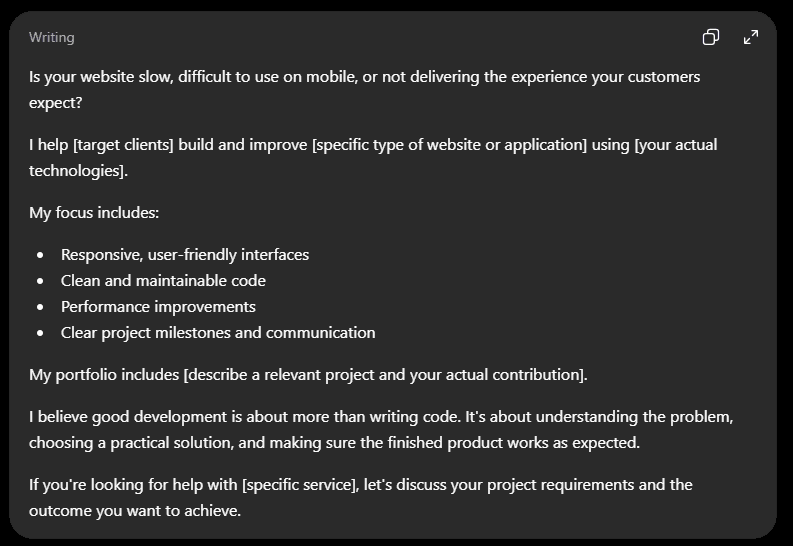
Avoid exaggerated claims. If you're a beginner, a well-explained personal project is better than a fabricated client success story.
10. Do Use Social Media to Support Your Upwork Journey
Upwork doesn't have to be your only source of visibility.
You can use LinkedIn, Facebook groups, relevant developer communities, and other professional social platforms to share your work, learn about business problems, and develop relationships with potential clients.
But don't treat social media as a magic shortcut to Upwork success.
What Should You Share?
For a web developer, useful content might include:
- A short demonstration of a website redesign.
- A before-and-after performance comparison with real measurements.
- A brief explanation of how you solved a coding problem.
- A walkthrough of a small SaaS feature you built.
- Lessons learned while developing a personal project.
For example, instead of posting, "I'm a professional React developer. Hire me," you could explain how you improved a navigation menu for mobile users and show the result.
That gives people something concrete to evaluate.
How to Use Facebook Groups and LinkedIn Professionally
Join communities relevant to your chosen niche. Participate in discussions, answer questions when you genuinely know the answer, and share useful resources without turning every conversation into a sales pitch.
You can also study discussions to identify recurring problems businesses face. If several store owners complain about slow product pages, that may suggest a service worth exploring.
However, verify job opportunities independently and follow each community's rules. Never assume that a social media lead is legitimate simply because the person has a profile or belongs to a business group.
And remember: social media activity does not replace a strong Upwork profile. Think of it as another window through which potential clients can discover your work.
11. A Simple 30-Day Plan to Get Started on Upwork
You don't need to overhaul everything in one day. A structured approach can help you focus on the activities that matter.
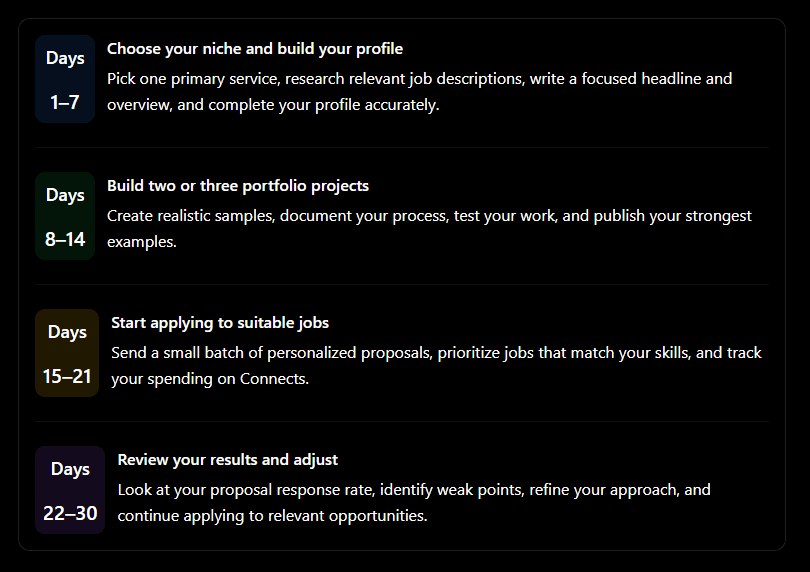
During the first month, focus on building a repeatable process rather than expecting a particular income or number of clients. Results vary depending on your skills, niche, competition, pricing, and the quality of the jobs you pursue.
12. Final Thoughts: What Does Success on Upwork Really Look Like in 2026?
Success on Upwork doesn't come from a secret proposal template, a special profile trick, or sending hundreds of applications every month.
It comes from making a series of sensible decisions, consistently.
Choose a niche you can deliver. Build a portfolio that demonstrates your ability. Apply to jobs that genuinely match your skills. Write proposals that address the client's problem, not just your qualifications. Price your services sustainably, protect your reputation, and learn from the responses you receive.
And don't compare your first month to the sixth year of someone else's freelancing career.
Freelancing is a bit like growing a garden. You prepare the soil, plant the seeds, water them consistently, and make adjustments as you learn what works. You can't force the harvest overnight.
Your goal isn't simply to win your first contract. It's to develop a process that helps you find suitable clients, deliver good work, and build a sustainable freelance business.
Frequently Asked Questions About Upwork in 2026
1. Is Upwork still worth trying for beginners in 2026?
It can be, provided you have a marketable skill, realistic expectations, and a willingness to learn how to sell your services. Competition varies by category, and getting the first contract may take time.
2. How many proposals should a beginner send each week?
A reasonable starting experiment is five to ten carefully selected proposals per week. Treat this as a test rather than a universal rule, and adjust according to your budget, interview rate, and available opportunities.
3. Can I get an Upwork job without previous client experience?
Yes, it's possible. Personal projects, demonstrations, open-source contributions, and relevant work from other contexts can help establish credibility. Clearly distinguish these from paid client work.
4. Should I lower my rates to get my first client?
Not necessarily. Consider offering a smaller, clearly scoped service at a fair price rather than drastically reducing your rate for a large, complicated project.
5. Which web development skills are worth exploring on Upwork in 2026?
Full-stack development, web design, frontend development, e-commerce development, and AI integration are all worth researching. Upwork's 2026 report identifies several of these as in-demand or fast-growing skills, but marketplace demand does not guarantee individual success.
6. How much does Upwork charge freelancers?
The published freelancer service fee ranges from 0% to 15% per contract. Check the specific percentage displayed when submitting a proposal or accepting an offer.
7. Is boosting a proposal necessary to get hired?
No. Boosting is optional, and paying for additional visibility doesn't guarantee an interview or contract. Start by improving the relevance of your applications and track results before deciding whether additional spending is worthwhile.
Ready to take the next step? If you're a web developer, start by selecting one service you can confidently deliver, building two or three strong portfolio examples, and writing a profile that explains the problems you solve. That's a practical foundation for your Upwork journey in 2026.